Type what you want. Print it in color.
Describe a model or drop in a photo — Layerpaint builds it, you color it with AI or the brush, and it exports print-ready for multi-color printing. Already have an STL? Load it and paint.
Describe it, get a model "a macaw on a branch" It builds the shape and drops it straight into the painter. A photo works too.
Or let the AI paint it "paint the macaw on the branch" The colors come back as filament swatches you can still change.
Or paint it yourself your own STL Click a part and it fills to the edges. Nothing leaves your machine.
Let the AI do it, or take the brush yourself.
Paint from a photo, or a prompt
Tell it what you want two ways. Your model is sent up to run the AI, then comes back ready to export for full-color printing.
Paint it by hand
The full toolset when you want control, running entirely in your browser — nothing leaves your machine. Region fill, a wand that stops at creases, guard planes, mirror painting, and a 600+ spool library.
- One click fills a whole panel
- Nothing uploads — fully on-device
- Clean speckle & too-thin-to-print checks
Same start, same finish — paint it your way.
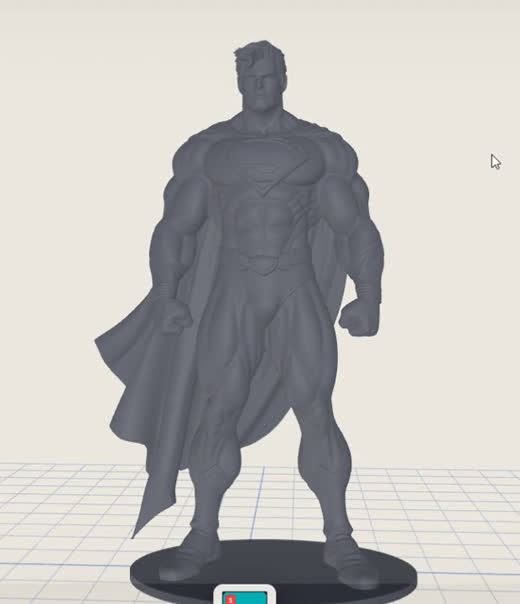
Drop in your model
Drag an STL, OBJ or 3MF onto the page — it loads right in your browser. No model? Describe one, or drop in a photo, and AI Create builds it ready to paint.
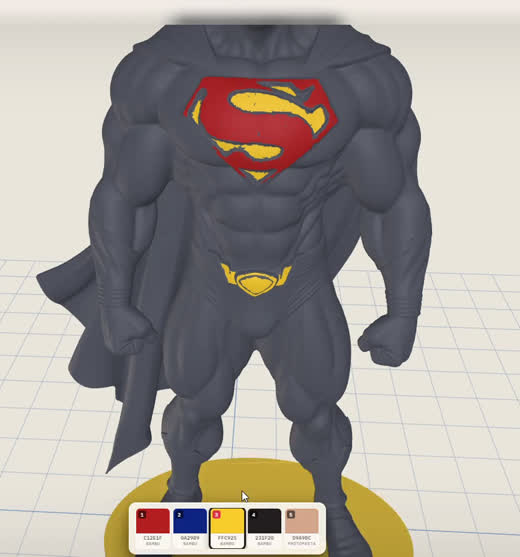
Paint by region
Click a part and it fills to the edges. Work through it region by region, brush and mirror for the detail.
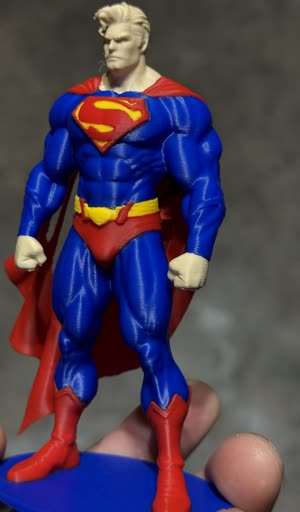 02 · With AI
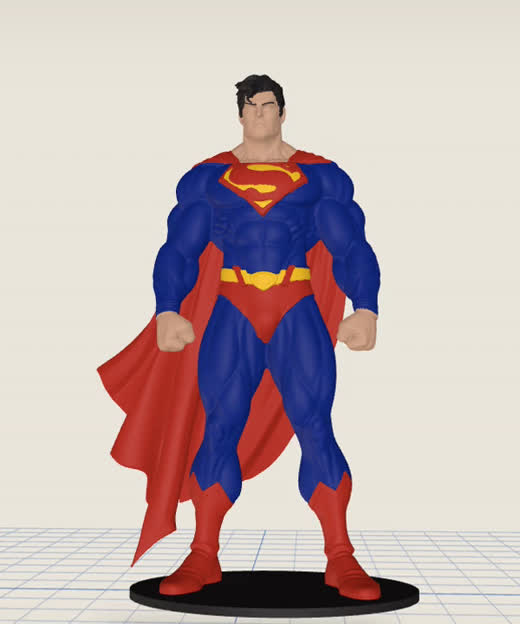
Paint with AI
Add a reference photo or describe the colors — the AI paints the whole model.
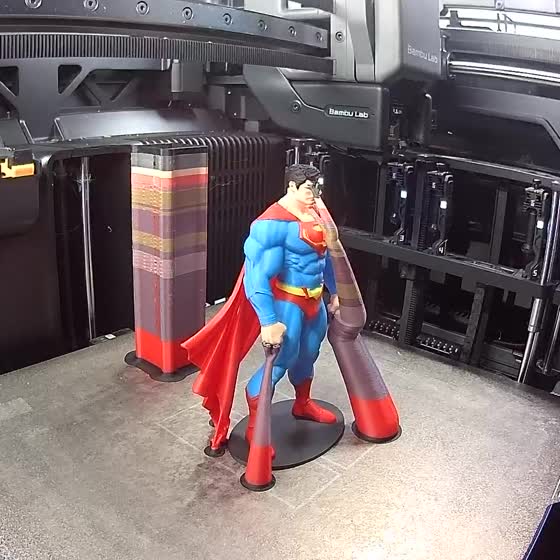
Export a 3MF
One click saves a Standard 3MF — open it in Bambu Studio, Orca or Prusa and print in color.
Both paths land in the same painter.
Paint from scratch by hand, or let AI lay the colors down — either way it comes back as editable regions you finish in the same tools.
Stamp a logo or a name straight onto the model.
Drop in a logo, a picture, or typed words, place the box where you want it, and hit Stamp. The artwork is cut into the mesh as real printed color — the slicers' text tools can't put an image on a model, and the usual answer is a detour through CAD. Every color in the artwork joins your filament palette automatically.
- ✓ Logos, images and typed text, in full color
- ✓ Mesh refined under the art so edges slice crisp
- ✓ Follows curved surfaces; pairs with Symmetry
Click once. It floods to the edges.
Most painters make you color one triangle at a time. Magic floods out from a single click and stops by itself at the model's natural creases, so a whole panel, horn or plate fills in one move.
- ✓ Click a surface — it fills up to the creases
- ✓ Scroll to size it, one degree at a time
- ✓ Click again to drop your color
Three things that make color actually easy.
Paint a whole panel in one click.
In most tools you color one tiny face at a time. Layerpaint reads the model's hard edges and turns each surface into a region, so filling a dragon's wing is one click instead of an afternoon of them.
- ✓ Auto-partition by crease angle
- ✓ Magic Fill, brush, mirror & detail tools
- ✓ Snap-to-crease for clean, exact seams
Design in the filaments you actually own.
The color picker is stocked with real spools (Bambu, Polymaker, Prusament, Overture), so what's on screen is what comes off the printer. It also tallies the filament swaps on each layer, so a print that's going to crawl is obvious before you slice it.
- ✓ 600+ real filament colors, by brand
- ✓ Live per-layer filament-swap counter
- ✓ See a color's print cost before you commit
Export once. It opens already colored.
Layerpaint saves a Standard 3MF using the official Materials Extension, so Bambu Studio, OrcaSlicer and PrusaSlicer pick up your colors on their own. You won't be redoing the paint job in the slicer or wrestling with a broken import.
- ✓ Standard 3MF · official Materials Extension
- ✓ Colors map straight to filament slots
- ✓ No re-painting, plugins or uploads
Everything in Layerpaint.
Magic Fill
Tap a part — it floods to the natural seams. Scroll to size it, catch soft edges, close gaps.
Brush & Fine detail
Paint by hand; fine mode follows the plane you click. Respects the borders you've drawn.
Isolate & Cut
Slice the model with a dragged line and hide the side that's in your way, or drop a guard sheet that paint tools stop at.
Borders
Draw where colors should split. Encircling strokes auto-close their gaps; a broad eraser clears them.
Grow & clean-up
Spread a color, fill bare gaps, clean stray specks, and flag patches too thin to print.
Theme palettes
Warhammer, superheroes, fantasy, sci-fi — plus 600+ real filament colors and skin tones.
Color swap
Change one color to another across the whole model in a single click.
Decals
Stamp a logo, image, or typed words onto the surface. It prints as real color with sharp edges.
Symmetry
Mirror every stroke across an axis — perfect for figures and armour.
Print check
Scrub the print layer by layer, with a per-layer filament-swap counter.
One clean export
A Standard 3MF that opens already-colored in Bambu Studio, OrcaSlicer & PrusaSlicer.
Reference image
Drop a concept image behind the model and match it as you paint.
Save & undo
.layerpaint projects, autosave, and a full undo/redo history.
We're always adding to it.
Here's some of what's shipped lately. More detail on the blog.
Chibi Figure — turn a photo into a printable figure
Upload a photo of a person and the painter draws a chibi concept sketch of them. Approve it, and about two minutes later the figure lands on the canvas — print it as-is or paint it first. Your first figure is free. Full walkthrough on the blog.
Draw straight lines, circles and squares onto the model
A new Shape tool. Drag a line, rectangle or circle straight onto your model in the active color — racing stripes, panel blocks, a ring around an eye. It cuts the surface fine enough that the edge stays crisp even on a low-poly mesh, and the shape sits there as a preview you can move, resize and reposition before you apply it. Nothing bakes in until you're happy.
Deleting a palette color asks first
Clicking the × on a swatch now confirms before it removes the color, so a mis-click can't wipe part of your paint job. And if you do delete one you were using, a single Ctrl+Z brings the color and the paint back.
Recolor a painted 3MF, free, in your browser
Got a multicolor 3MF and want to change the filaments without repainting it? The new 3MF recolor tool swaps the colors in your browser and hands the file straight back. Nothing uploaded.
Repair a broken STL, free, in your browser
Non-manifold edges, holes, a mesh a slicer won't accept? The new STL repair tool patches it in the browser — drag it in, download a clean file. No install, nothing uploaded.
Build a model from up to four photos, at the detail you choose
One photo means the AI has to invent the back and the sides. Give it up to four angles of the same object and it doesn't have to. There's also a Detail control now — models used to arrive at 30,000 triangles, and a color border can only be as sharp as the triangles it runs along. It's 200,000 by default, and you can drop it if your machine would rather have the speed.
Resize in the editor, and see the size you're actually printing
Scale the model where you're painting it, either by dragging a handle or by typing the dimension you want. Its real measurements sit in the corner while you work, in millimeters or inches, so the size stops being something you find out about in the slicer. Size moved into Setup, and the tools moved into a popout so the rail stays short.
Decals — stamp a logo, image, or words onto the model
Drop in a logo or type a name, place the box, hit Stamp. The artwork becomes printed color with crisp edges, and its colors join your palette automatically. Works on curved surfaces too.
Turn any image into a 3D model — AI Create
Drop in a photo, a logo, or a sketch — or just type what you want — and Layerpaint converts the image into a printable 3D model, repaired and ready to paint. Not the flat relief a PNG-to-STL converter makes: an actual sculpted shape.
Paint from a photo — AI Paint
Show Layerpaint a reference photo, describe the colors you want, or do both — the photo leads and your words steer it. The colors come back fully editable, so you can adjust any part before you export a Standard 3MF.
A guided first paint
New here? A short walkthrough gets you painting your first model, and a few starter models are ready to open so you don't have to bring your own just to try it.
Three new free tools
A filament color matcher, an STL viewer with measure and mesh-health checks, and 3MF / STL / OBJ converters — all in the browser, nothing uploaded.
 Made to order · Isle of Wight
Start free. Pay as you grow.
You only pay for new models — re-exporting the same one is always free. Ten models, or unlimited. AI generations run on their own credits.
- Your first export, full quality
- No watermark, no size cap
- Re-export it anytime, free
- Export any number of models, forever
- All future updates included
- AI generations run on credits, bought separately
- Upgrade within 30 days: your latest export pack is refunded
- 7-day money-back guarantee

Have a discount code? Enter it on the payment page.
Common questions.
Does this work with Bambu Studio and the Bambu AMS?
Does it support Prusa MMU3 and Anycubic ACE Pro / Creality CFS?
How is this different from Bambu Studio's built-in paint tool?
Can I paint miniatures, terrain, and tabletop models?
How does AI Paint work?
How much does an AI paint cost? Does a bigger model cost more?
Can it make the model for me?
Can it turn a photo into a figure of me?
Can I convert an image to STL?
Do I need a multi-color printer?
What is a "Standard 3MF" and why does it matter?
<m:colorgroup>) lets a 3MF carry per-triangle colors that any compliant slicer can read without proprietary metadata. Layerpaint exports exactly this — so your colored model is portable across Bambu Studio, OrcaSlicer, PrusaSlicer, and Anycubic/Creality forks.Is my model uploaded anywhere?
How big a model can I paint?
Can I save my work and come back?
.layerpaint project file (mesh + paint state, gzipped). Reload it any time, from any machine.Do I need an account to try it?
What if I want to use it on another machine?
Refunds?
Who's behind it?
Questions, bugs, or feature ideas?
Your next print,
in full color.
Paint, preview, and your first export are free. Then 10 models for $6.97, or go unlimited for $39.97.